← Back to home Backtesting

Backtesting with market replay: a forex trading simulator that doesn't lie to you.

Replay the market candle by candle, as if you were there: future candles stay hidden, your orders are simulated with real execution costs, and your results are computed with the same formulas as your real trading journal. Forex, gold, indices, crypto and oil, from one minute to one day.

app.tradoshi.com · backtesting — demo data
Backtesting software and day trading simulator
Why backtest here

An honest backtest, or nothing.

🕯️

No future leak

The replay advances candle by candle and the future stays hidden. Impossible to cheat, even by accident.

🧾

Real execution costs

Spread, slippage, commission, swap: you set your broker's costs and your results account for them.

📐

The same stats as your journal

Your backtest sessions are scored with the exact formulas of your real trading journal. Comparable, therefore usable.

The replay

Replay the market, candle by candle.

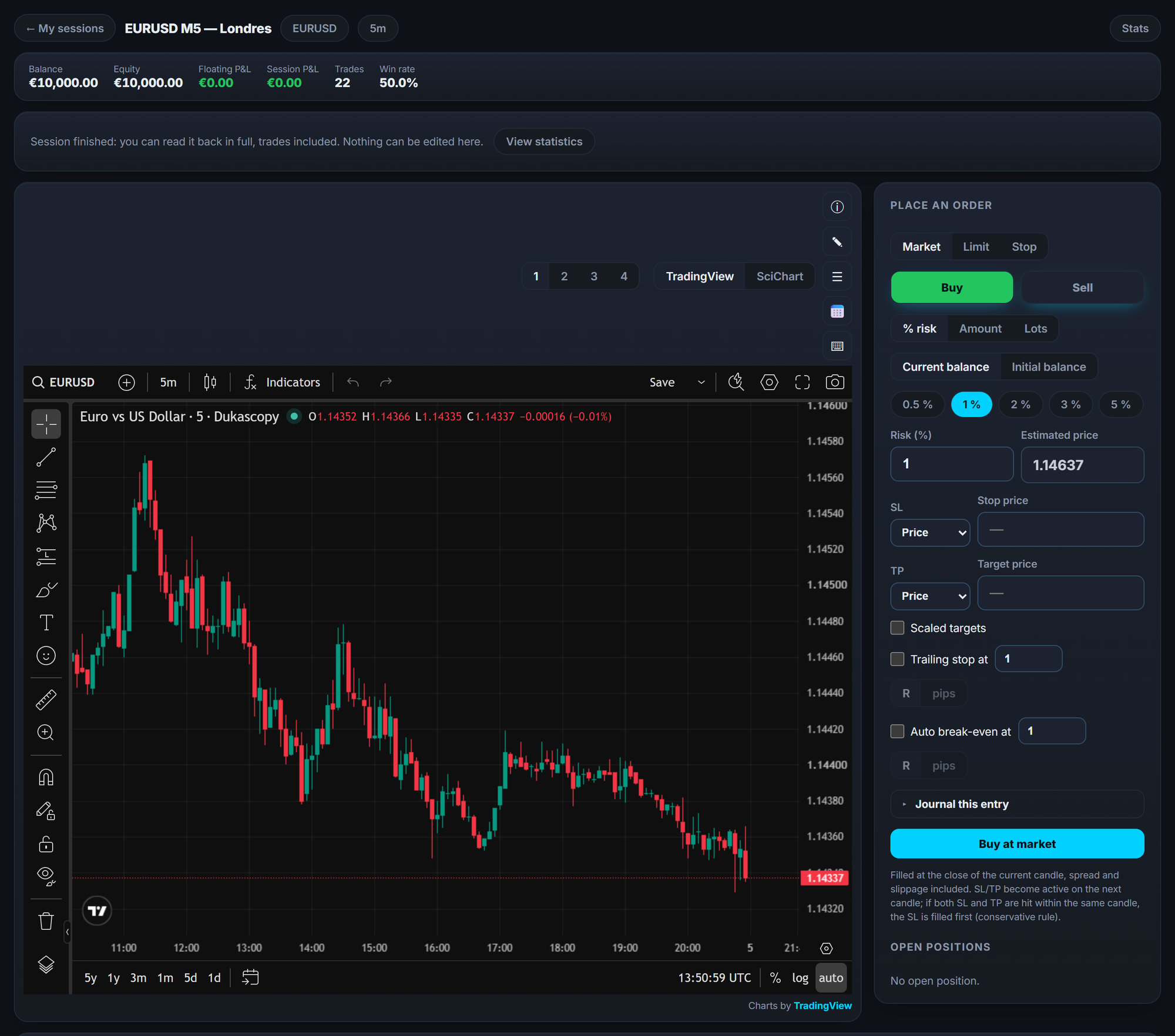
Pick your market, your period and your timeframe, then move forward: candle by candle from the keyboard, or in continuous playback from 1× to 16×. You can jump to a given date, step back, and follow up to four charts side by side. The session rail shows the economic calendar of the day you are replaying, your notes and your order log, and your keyboard shortcuts can be remapped.

app.tradoshi.com · replay
Replay the market, candle by candle.
Your orders

Place your orders like in live trading.

Market, limit and stop orders, both ways. Stop loss and take profit checked as you type, automatic break-even at a level you choose, staggered targets and partial closes. Your size is computed from a risk percentage, a percentage of your balance, a lot count or an amount, and the app refuses a stop placed on the wrong side of the price. When a candle is ambiguous, the rule is always conservative: the stop fills first.

Buy XAUUSD · 0.50 lotSL 2,386.20 · TP 2,394.80 · break-even armed
50% partial exit at +1RThe rest runs to the next target
Conservative rule: SL filled firstIf a candle touches both SL and TP, we count the loss
Strategies

Every session feeds a strategy.

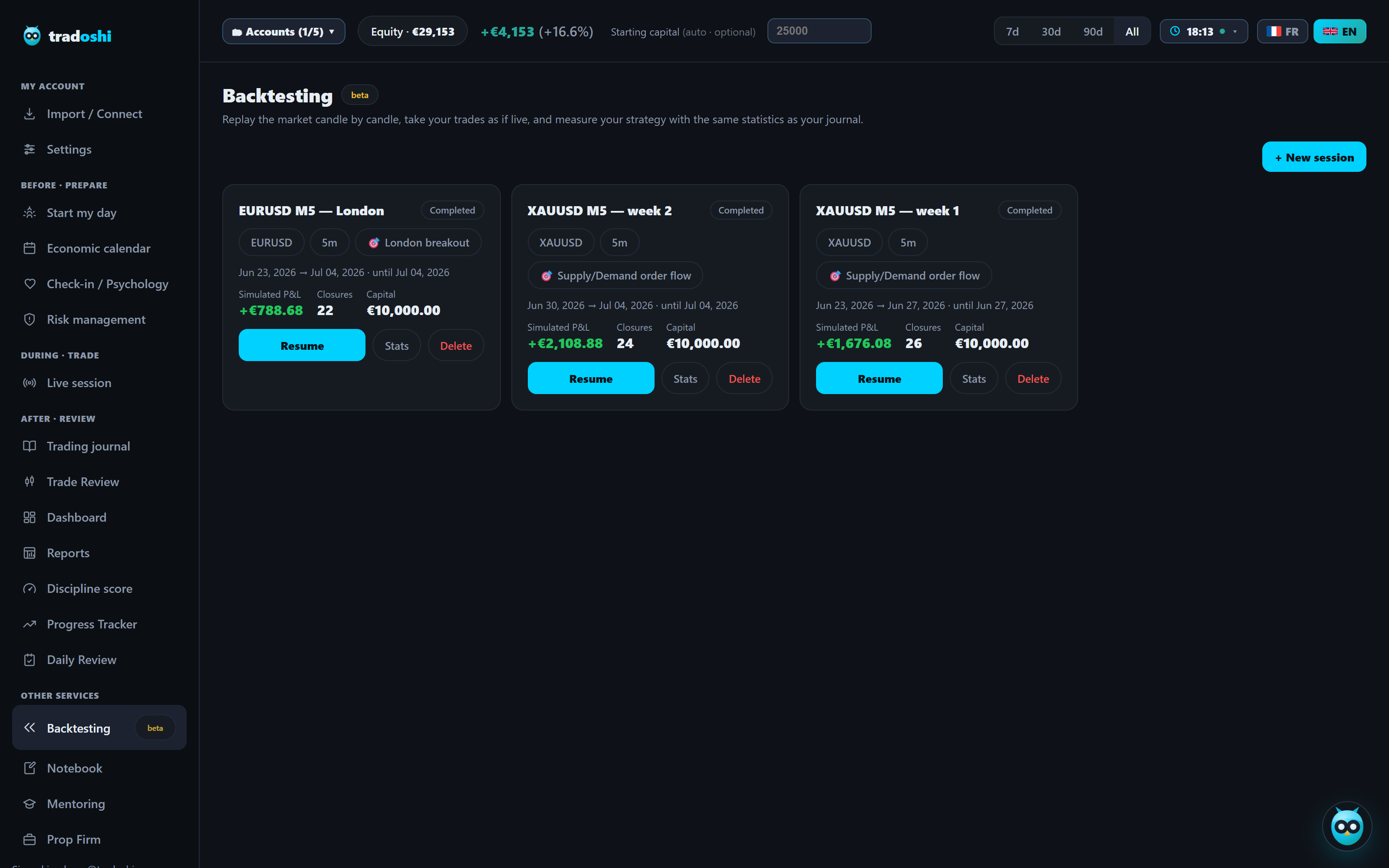
Your backtest sessions are attached to strategies: you accumulate evidence that an approach works (or doesn't) across periods and markets, instead of one isolated, quickly forgotten test. The strategy report adds up sessions, trades, win rate, expectancy per trade, simulated P&L and return. You can pause a session and resume it exactly where you left off.

Included from the Pro plan (10 strategies), unlimited on Premium.

Strategy "London breakout"3 sessions · 74 simulated trades · 1.8 profit factor
Strategy "Supply/Demand gold"5 sessions · 112 simulated trades · 2.3 profit factor
Resume a session where you left itThe cursor and your positions are restored
The backtest journal

Your intent, written before the outcome.

A backtest that only says "+2.3R" teaches nothing. At every entry you write why you are entering, now, at this price: it is the one note the outcome can no longer colour. At the exit you tick the rules you followed, tag the trade and debrief it. The trade table exports to CSV, and performance by tag tells you which setup actually pays.

"Why I'm entering, now, at this price"Written at entry, before you know
Rules followed: 4 / 5Ticked trade by trade, against your own rules
Debrief: "entered too early, I front-ran the break"Tags, exit reason, CSV export
The markets

Which markets can you backtest?

The simulator replays minute-level historical data, aggregated to your session timeframe: 1 min, 5 min, 15 min, 1 h, 4 h or 1 day. The timeframe is fixed for the whole session, like in live trading: you don't switch lenses in the middle of a trade.

  • Forex: 28 pairs, the seven majors and their crosses (EURUSD, GBPUSD, USDJPY, GBPJPY, EURAUD, AUDNZD and more). That is the core of the forex trading simulator.
  • Metals: gold (XAUUSD) and silver (XAGUSD).
  • Indices: US30, NAS100, US500, GER40, UK100, JP225.
  • Crypto: BTCUSD, ETHUSD, LTCUSD.
  • Energy: US oil (USOIL) and Brent (UKOIL).

What the simulator does not replay

No cash equities, no futures contracts, no options. If you trade the S&P 500 or the Nasdaq, you backtest the index CFD (US500, NAS100), not the ES or NQ contract: the levels follow the same underlying, the basis and the expiries do not. Better to know that before drawing conclusions about a futures order book.

Before the session is created, the app tests data availability for your symbol and your date. If the range does not exist, it tells you plainly instead of filling the gap with invented candles.

How it works

How to backtest a trading strategy, step by step

1

Write your rules before testing them

A strategy gets a name, a description and its entry and exit rules. They are written down: every trade will be judged against them, not against the memory you keep of them.

2

Pick the market, the period and the capital

Symbol, timeframe, start date (at least two days in the past), optional end date, starting capital and currency (USD, EUR, GBP, CHF, CAD, AUD). Data availability is tested on screen before you start.

3

Set your costs and your risk

Spread and slippage in pips, commission per lot, long and short swap per night, risk per trade as a percentage and a default size. These are your broker's costs, not a marketing average: that is what separates a useful backtest from a flattering one.

4

Replay and take your trades

Step candle by candle or play from 1× to 16×, wait for your setup, place your orders, write your intent at entry. The future stays hidden: your patience is tested at the same time as your rules.

5

Read the numbers, debrief, start again

At the end the session is scored like your real trading journal, and you can replay it in full, trades included, with nothing left editable. One session proves nothing; it is the accumulation, strategy by strategy, that starts to mean something.

The numbers

Every number you need to judge an edge

Simulated P&L and return

The net P&L of the session, costs deducted, and the return against your starting capital.

Win rate and profit factor

The share of winning trades, and the ratio between what your winners bring in and what your losers cost.

Expectancy and average R

What an average trade brings in, and your R multiple computed on the stop you actually placed.

Max drawdown and equity curve

The worst dip you went through during the session, and the curve that shows how you got there.

P&L by day and by month

The spread over time: an edge that holds on a single day is not an edge.

Longs, shorts and tags

Your performance by direction and by tag: the setup that pays is not always the one you like best.

Two ways to backtest

Automated backtest or manual replay: what each one tests

Both are useful, they simply answer different questions.

What gets tested
Automated backtest
Tradoshi replay
What a machine can read
Coded rules, no ambiguity
Your written rules, applied by you
Discretionary setups
Hard to code, usually simplified
Tested exactly as you trade them
Speed
Thousands of trades in seconds
A session takes the time it takes
Overfitting risk
High as soon as you optimise parameters
Low: you cannot see what comes next
Patience and execution
Never tested
Tested on every candle you wait through
Execution costs
Often idealised
Spread, slippage, commission, swap, yours
Backtesting for free

Free backtesting: what you can do without paying

Let's be straight about it: backtesting in Tradoshi starts on the Pro plan. But you do not have to pay to start backtesting, and it is worth knowing what each free option really gives you. Checked on 12 September 2026, at the source.

  • TradingView's Bar Replay: available on every plan, but the depth of intraday history depends on the plan. Entry plans replay six months of one-minute data (more on higher timeframes), and full depth is reserved for the top plans. No order management, no journal.
  • FX Replay's free plan: no credit card, but two sessions, one indicator, fifty trades per session, one week of data retention and a one-month maximum session. Enough to try, not enough to build evidence.
  • MetaTrader 5's Strategy Tester: free with the terminal, and serious. It tests robots and indicators, not you: in visual mode you watch the Expert Advisor trade, you do not place your own orders.
  • A spreadsheet: free forever, and honest if you log every simulated trade. It is slow, but it is how most traders started. Our free Excel journal template downloads without paying anything.

And with us: the trading journal, the statistics and one synced broker are free forever. Backtesting arrives on the Pro plan, with ten strategies, and the paid plans come with a seven-day trial. A card is required to start it, you can cancel before it ends, you pay nothing and you fall back to the free plan without losing your data. That is the honest way to say "backtest for free": for seven days, with no session or trade limit.

Words that get mixed up

Backtesting, trading simulator, paper trading, forward testing

Backtesting tests a strategy on past data, trade by trade. A trading simulator is the tool that lets you live it in simulated time: that is exactly what Tradoshi's replay does, on candles that have already printed.

Paper trading, on the other hand, runs on live market prices with no real money: that is real time, not replay. Tradoshi does not do paper trading; your real journal, though, measures exactly what you do live, which is what forward testing means.

The order that works is almost always the same: backtest to find out whether the idea holds, forward test to find out whether you hold.

Customer reviews of the trading journal

★★★★★

“I found in Tradoshi a complete and thorough tool to track my trades, I use it every day. The interface is playful and clear, and it takes both the technical and the psychological side into account. I recommend it 100%.”

— Kevin.M, customer review, August 2026 (translated from French)
★★★★★

“A very good platform for traders of all levels, the pricing is attractive and customer support is responsive. The site itself is harmonious, easy to navigate, and you can connect your MetaTrader account to keep proper track of your trades. I recommend it!”

— Mister.D, customer review, August 2026 (translated from French)
★★★★★

“I have been using Tradoshi for a few months for my SMC/ICT trading journal, and it is the first platform where the free plan really lets you log your trades and follow your stats, with no cap from week two like everywhere else. Setup-by-setup tracking (order blocks, FVG, liquidity sweeps) is precise, not a generic table, and I can tag my trades exactly. Simple interface, quick to get to grips with. I recommend it to any trader who wants to structure their discipline without pulling out a card in the first month. Support is very responsive.”

— Josette.C, customer review, September 2026 (translated from French)

Testimonials appearing on this website may not be representative of other clients or customers and is not a guarantee of future performance or success.

Frequently asked questions

Where does the market data come from?

From minute-level historical data, aggregated to your replay timeframe. If a range is unavailable, Tradoshi tells you clearly rather than filling gaps with invented data.

Is there free backtesting software?

Yes, several, each with its limits: TradingView's Bar Replay (history depth depends on the plan), FX Replay's free plan (two sessions, fifty trades), MetaTrader 5's Strategy Tester (free, but it tests robots, not you) and the plain spreadsheet. In Tradoshi, backtesting starts on the Pro plan, and the paid plans come with a seven-day trial you can cancel before it ends.

Which markets can I backtest?

28 forex pairs, gold and silver, six indices (US30, NAS100, US500, GER40, UK100, JP225), BTCUSD, ETHUSD, LTCUSD, and oil (USOIL, UKOIL). On 1 min, 5 min, 15 min, 1 h, 4 h or 1 day.

Can I backtest stocks, futures or options?

Not today. The simulator covers forex, metals, index CFDs, three cryptos and oil. If you trade the S&P 500 or the Nasdaq you can replay the index (US500, NAS100), but that is not the ES or NQ contract.

Is this paper trading?

No. Paper trading runs on live prices with no real money; here you replay past candles, so you can test a month of market in one evening and run the same sequence as many times as you want.

What order types can I place in the simulator?

Market, limit and stop, buy and sell, with stop loss, take profit, automatic break-even, staggered targets and partial closes. Size is computed from a risk percentage, a percentage of your balance, a lot count or an amount.

Can I speed up the replay or jump to a date?

Yes: continuous playback from 1× to 16×, candle-by-candle stepping, jumping to a given date, stepping back, and up to four charts open at the same time.

Can I backtest without risking money?

Yes, that's the whole point: it works as a day trading simulator, and every order is simulated. You validate your edge, your risk management and your patience before paying the market to learn.

Can I export my simulated trades?

Yes, a session's trade table exports to CSV, with your entry intent, your tags, the exit reason and the rules you followed.

Is backtesting included in my plan?

It's included from the Pro plan, with up to 10 strategies. The Premium plan unlocks it unlimited. The paid plans come with a seven-day trial.

What is backtesting in trading?

Testing a strategy on past market data, trade by trade, to find out whether it had an edge before you commit money to it. What it proves, and above all what it doesn't, is covered in our guide: what is backtesting in trading.

How do I backtest a trading strategy?

Write your entry, exit and risk rules first, then replay the market without peeking ahead and log every trade as if it were real. The full method, and the biases that skew a backtest, are in our guide on how to backtest a trading strategy.
Go further

Our guides on journaling, method and tools.

Validate your strategy before the market does it for you.

Free plan, no credit card and no time limit.

Start for free