tradoshi
Communauté francophoneComunidad hispanohablanteComunidade brasileira

App updates

App improvements, as they ship.

Live Session: the live chart comes to MetaTrader

The live price chart is now also available for MetaTrader accounts in the Live Session.

Your entries and exits on the chart
While you trade, you follow the price as it moves and see your entries and exits right on it. That way you keep an eye on what you do, at the moment you do it.

To use it, open the Live Session with your MetaTrader account: the chart shows up with your positions.

Open the topic and reply →
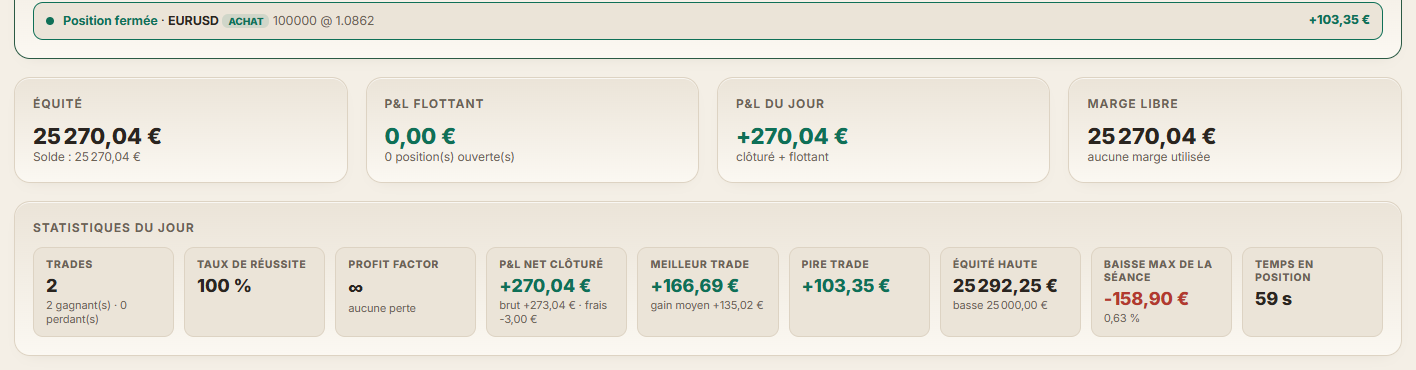
Live Session: a just-closed position announced at the top, followed by equity, the day's P&L and the day's stats.

Live Session comes alive: every position announced, your daily stats and a live chart for Saxo

Live Session now shows every position you open and close the moment it happens. Numbers light up when they change, so you can spot right away what's moving on your account.

Your daily stats, always up to date
With every update, your stats for the day are recalculated: win rate, profit factor, best and worst trade, max drawdown and time in position. You know where your day stands without waiting for the close.

A live chart for Saxo accounts
If you trade with a Saxo account, you also get a live chart showing your entries and exits on your broker's candles. Open Live Session while you trade and follow your day in real time.

Learn more: app.tradoshi.com

Open the topic and reply →

Android 1.2.9: the size of each trade in Trade Review

Version 1.2.9 of the Android app is out. Trade Review now shows the size of each trade and the price difference, so you can check every result at a glance.

What changes for you
Open Trade Review: for each trade, you see its size and the price difference right away. No need to recalculate to understand where a gain or a loss comes from.

Another improvement: a smoother start once your broker is connected. Update the app to get it.

Open the topic and reply →

A simpler welcome after you sign up

Your first steps in Tradoshi are calmer now. The connection assistant no longer pops up again when you come back from cTrader, Tradovate or Saxo, or at the start of each visit. You pick up your journal right where you left it.

You know where your account stands
If your account is connected but your trades haven't arrived yet, you now see "Your account is connected, I'm reading your history". No more wondering whether the connection worked.

One window at a time
After the questionnaire, windows no longer stack up. The forum invitation waits for your first real trade before it shows up.

And if the Premium trial can't start, the reason is explained in Import / Connect, with a link to the help pages so you know what to do.

Open the topic and reply →

Trade Review now shows each trade's size and price difference

Trade Review now shows two more details for every trade: its size, in lots, and the difference between the entry and exit price, measured in the direction of the trade.

What changes for you

No more doing the math in your head. With the lot size and the price difference right there, you can check a gain at a glance.

Open Trade Review, go through your trades and you'll find these details on each one.

Learn more: app.tradoshi.com

Open the topic and reply →

Android 1.2.8: straight to your dashboard after syncing

Version 1.2.8 of the Android app is out. After a successful sync of your account, you now land directly on your dashboard, with no extra step.

End of your Premium trial
When your Premium trial ends, the app tells you clearly what you keep with the free plan. You know exactly where you stand.

This version also includes fixes to the onboarding for new accounts. Update the app to get them.

Open the topic and reply →

Android 1.2.7: 14 days of Premium, Trade Review and Match-Trader

Version 1.2.7 of the Android app is out. It gives you 14 days of Premium, no credit card needed. They start at your first login, so there's nothing else to do.

Trade Review is back
Replay each trade on its chart to look at your entries and exits in context.

New connections and imports
You can now connect your Match-Trader account and import your Lightyear statement. For an imported account, you can also choose its currency.

Update the app to get all these changes.

Open the topic and reply →

Trade Review is open again

You can once again replay each of your trades on its chart: entry, exit and market context, candle by candle.

How to use it
Open a trade from your journal and launch Trade Review. Step through it candle by candle to see what the market was doing when you got in and when you got out, and compare what happened with what you had planned.

Candles for recent days are available too, so you can review your latest trades right away.

Learn more: app.tradoshi.com

Open the topic and reply →

Choose the currency of an imported or manually entered account

You can now choose the currency of an account, whether you imported it or entered it by hand. Dollar, euro, pound and many other currencies are available.

How to do it
Go to Import / Connect, open the account menu and pick « Change currency ». Select the one that matches your account and you're set.

Nothing is converted: only the symbol and the format of amounts change. Your choice is kept for future imports, so you don't have to set it again.

If you import a MetaTrader 5 statement, the currency is also read straight from the file.

Learn more: tradoshi.com/forum/aide-support/changer-la-devise-d-un-compt…

Open the topic and reply →

A trade you delete from your journal stays deleted, even after a sync

When you delete or merge trades by hand in your journal, those changes now hold from one sync to the next. You can tidy up your journal your way without the next sync undoing your work.

Want deleted trades back?

Go to Import, click "Update sync", then choose the period you want to reimport. The trades from that period come back into your journal.

Learn more: app.tradoshi.com/#import

Open the topic and reply →

Android 1.2.6: see more before you decide

Version 1.2.6 of the Android app is out. It helps you see things more clearly before you make a decision.

Prop Firm
You can now see how much you can still lose today, which rule you'll hit first and how many trades that represents. That way you know where you stand before opening your next position.

Examples to explore screens
Screens that aren't part of your plan now open on an example, so you can see what they do before you choose.

Notebook
Write with AI is now available on all accounts. Open your Notebook and give it a try.

Open the topic and reply →

Prop firm: see how much you can still lose before breaking your challenge

On every challenge you track in Tradoshi, you can now see at a glance how much you can still lose today without breaking your prop firm's rules.

What you see on each challenge

  • The amount you can still lose today.
  • The rule that would stop you first.
  • What that margin means in trades at your usual risk.

So before you open a position, you know how much room you really have left and which limit to watch. Open your challenge in Tradoshi and you'll find this information right there.

Learn more: app.tradoshi.com/#propfirm

Open the topic and reply →

Android 1.2.5: Brazilian Portuguese and polish

Version 1.2.5 of the Android app is out. It brings a new language and a few refinements to make your journal smoother day to day.

The app in Brazilian Portuguese
You can now use Tradoshi in Brazilian Portuguese. Dates, numbers and daily notes now follow the interface language: pick your language and everything displays consistently.

Clearer backtesting
In backtesting, the unstable source warning now only shows up when it's actually useful to you. Fewer unnecessary alerts, more room for your analysis.

Update your app to get it.

Open the topic and reply →
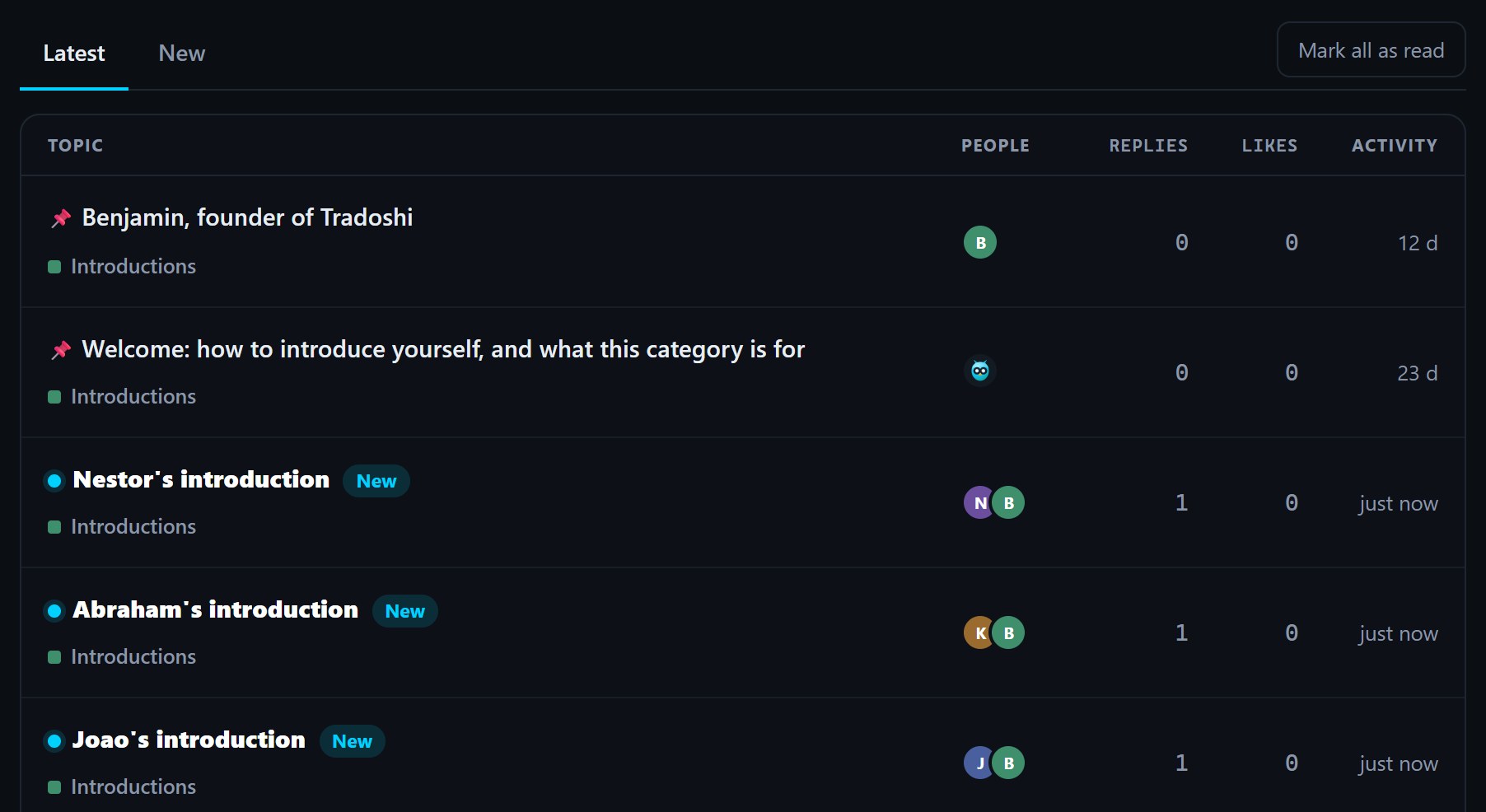
A forum category where unread topics are marked with a blue dot, a bold title and a New badge.

Spot new forum messages at a glance

Catching up on the forum just got easier. Topics that are new or have received replies since your last visit are now highlighted in every list, along with the number of new replies. You can see right away where the conversation has moved on.

Unread counts and participants

Each category now shows how many unread topics it holds, so you know where to head first. Every topic also displays everyone taking part, which helps you see at a glance who is in the discussion.

Start fresh in one click

All caught up, or just want a clean slate? One click marks everything as read. Next time you drop by, only what's truly new will stand out.

Learn more: tradoshi.com/en/forum

Open the topic and reply →

A complete Crypto section on the forum

The forum now has a Crypto section with more than ten rooms to talk about everything happening on-chain: Bitcoin, altcoins, crypto trading, DeFi, memecoins, security and scams, and taxes.

Each topic has its own space, so you can quickly find the discussion you care about and share your experience with other traders.

Discussions, not signals

This is a place for conversations and opinions. No trading signals are posted: your decisions stay yours. Drop by, pick your room and join in.

Learn more: tradoshi.com/en/forum

Open the topic and reply →

Trading schools can now add themselves to the directory

Is your trading school missing from the Tradoshi directory? It can now create its own listing straight from its school space.

How it works

To confirm the request really comes from the school, a verification code is sent to an address on the school's website domain. Entering that code validates the listing.

Verified listings get a "Verified on Tradoshi" badge that the school can display on its own website. So when you're looking for a course, you know the listing was created by the school itself.

Learn more: tradoshi.com/ecoles-de-trading

Open the topic and reply →

New articles and podcast episodes now show up on the forum

Every new blog article and every new Tradoshi podcast episode now appears in the "Right now on Tradoshi" thread on the forum.

Read or listen in your language

Each post comes with a link to every available language. You pick yours and go straight to the content, no searching needed.

Drop by "Right now on Tradoshi" to see what just came out on the blog and the podcast, and share your thoughts with the community.

Learn more: tradoshi.com/en/forum

Open the topic and reply →

The news feed comes to the forum

From now on, when you open the forum, a news feed is waiting for you right at the top. At a glance, you can see what's happening in the community without browsing every section.

What you'll find there
Today's sign-ups, active traders, synced accounts and the community's latest badges, proofs and introductions.

There's nothing to switch on: head to the forum and you'll see it at the top of the page. Use it to welcome newcomers or discover other traders.

Learn more: tradoshi.com/en/forum

Open the topic and reply →

The full forum is now in the Android app

The new version of the Tradoshi Android app brings the full forum to your phone. You no longer need to open your browser to join the conversations with other traders.

What you can do in the app
You can start a topic, like a post, follow a thread with the bell to get notified of new replies, and edit or delete your own posts.

It's the same forum as on the website: your topics, replies and followed threads show up in both places. Update your app and find the forum right inside it.

Learn more: play.google.com/store/apps/details?id=com.tradoshi.app

Open the topic and reply →

You can now add images to your forum posts

A screenshot often says more than a long paragraph. You can now attach images to your forum posts: a chart screenshot, your setup, a result you want to share or get feedback on.

How it works

In the editor toolbar, click the image icon, pick your file, and you're set. This option is available from your second post onward.

Before they go live, your photos are made lighter and stripped of their metadata. You share what you choose to show, nothing more.

Learn more: tradoshi.com/en/forum

Open the topic and reply →

The forum is now fully available in the app

Everything you can do on the website forum now works from the web app too. No need to switch tabs or log in again: you get the same page with the same features.

What you can do from the app
Create a topic, like a post, follow a thread with the bell to get notified of new replies, and edit or delete your own posts.

Open the forum from the app and join the conversation without leaving your trading journal.

Learn more: app.tradoshi.com/#forum

Open the topic and reply →

Forum update: Likes, a formatting toolbar and community flags

The forum is getting an update to make your conversations easier and more pleasant. Here's what changes for you.

What's new
A Like button now sits under every post: one click is all it takes to show that a reply helped you or that you enjoyed what someone shared. When you write, you now have an icon toolbar that lets you format your text without memorizing any code.

The Create topic button and the bell now appear on every page. You can start a discussion or check the bell wherever you are on the forum.

Finally, flags take you to the English and Spanish-speaking communities in one click. Have a look around, start a topic and feel free to like the posts that help you.

Learn more: tradoshi.com/en/forum

Open the topic and reply →
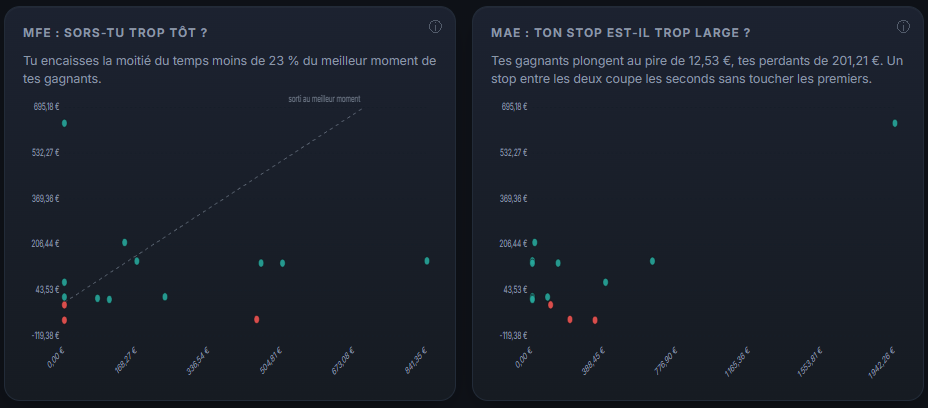
Les deux graphiques MFE et MAE du tableau de bord Tradoshi, avec la diagonale du trade sorti au meilleur moment

MFE and MAE: what each trade offered before you closed it

Two columns and two charts land in the journal, and they answer two questions everyone asks without ever having the figures.

MFE: are you exiting too early? For each trade we look at the best moment it offered while it was open, and compare it with what it actually paid you. If your winners were regularly worth far more at their best moment than what you banked, you are cutting too soon, and you can now see it in figures instead of impressions.

MAE: is your stop too wide? Same idea the other way around: we look at the worst moment each trade went through. If your winners never dip very far while your losers go much lower, there is a stop level that cuts the latter without touching the former.

Both columns are toggled in the journal, and both charts can be added to the dashboard.

One thing to know before reading them. The values are computed from market candles, not from your statement alone. A trade whose market we cannot match shows a dash rather than a number: we would rather show nothing than show an implausible value.

If something looks wrong on one of your trades, tell us in the Help section, with the trade concerned.

Open the topic and reply →

Android 1.2.1: a lighter top of the screen on phones

On phones, the top bar now keeps only the essentials. Everything else has moved into the account card, just above, so you get to what matters faster.

What changes for you
The account switcher now sits right where you already read which account is displayed, so you can switch accounts without searching. The price ticker is no longer cut off at the edges, so you can read it in full.

All in all, you gain about a third of the height before the first useful content. Update the app to version 1.2.1 to get it.

Open the topic and reply →

The Android app moves to 1.2.0

The app redesign is now on Android with version 1.2.0. Here's what changes for you day to day.

What's new
Navigation now runs through a new menu at the bottom of the screen. When you sign up, you're asked for your profile right from the start. In the Journal and in Trade Review, you now get the MFE and MAE for each trade, so you can see how far the market moved in your favor and against you. And Quantower joins the list of available connectors.

What's fixed
The app no longer gets stuck on the logo when opening.

Update the app to get all of this, and tell us what you think right here.

Learn more: play.google.com/store/apps/details?id=com.tradoshi.app

Open the topic and reply →

Apex, Take Profit Trader, Tradeify and Bulenox rules now load automatically in Prop Firm

Taking a challenge with Apex, Take Profit Trader, Tradeify or Bulenox? No more copying the rules by hand: Prop Firm fills them in for you.

How it works
When you create your challenge in Prop Firm, type your firm's name. The official profit target, drawdown, daily loss limit and consistency rule are pre-filled right away. You also see the source and the date the rules were collected, so you know where they come from.

Every firm has its own pitfalls. The ones that apply to yours are flagged right on screen, so you have them in mind from the start.

Open the topic and reply →

Your public page now shows the widgets and columns you choose

Your public page is now truly yours. You decide what others get to see: calendar, equity curve, dashboard metrics. Just tick what you want to show, and everything else stays private.

Pick your journal columns too
Emotion, tags, volume... Select which columns from your journal appear on your public page. You share what matters to you, without revealing everything.

The numbers shown are the same as in your app. And before you publish, a preview shows you exactly what your page looks like, so you can fine-tune your choices with peace of mind.

Learn more: app.tradoshi.com

Open the topic and reply →

Forum badges are live

Five badges now show up on your forum profile. They highlight your participation and the help you give other traders.

The badges and how to earn them
Introduction done: post your thread in Introductions. First reply: reply to someone for the first time. Forum regular: ten replies spread over five different days. Forum pillar: forty replies over twenty days, a badge that comes with time. Helpful reply: awarded by hand when your reply got someone unstuck.

Where you can take part
For now, you can start a new topic only in Introductions; the other categories are read-only. You can, however, reply in every category, and some topics are waiting for an answer.

So the first two badges are within reach right away: introduce yourself, then reply to a thread that speaks to you. Forum regular will follow if you keep coming back.

Learn more: tradoshi.com/en/forum

Open the topic and reply →
Tradoshi, the trading journal

Connect your accounts, measure what you actually do, and keep a record.

Discover Tradoshi
Also worth reading The blog · Pricing · The academy
Trading involves a risk of loss, up to the entire capital committed. Tradoshi is a journaling and analytics tool: we provide no financial advice and guarantee no result. Futures and forex trading contains substantial risk and is not for every investor: an investor could potentially lose all or more than the initial investment, and only risk capital should be used for trading. Hypothetical performance results have many inherent limitations: they are generally prepared with the benefit of hindsight, involve no financial risk, and no representation is being made that any account will or is likely to achieve similar results. Past performance is not necessarily indicative of future results. Full risk disclosure.