Before you start
- You need Quantower installed on your computer; the free version is enough. Download Quantower →
- Setup happens on the computer running Quantower, not from a phone: Quantower is Windows software, and the collector is dropped into its folders. After that, you check your trades from anywhere, mobile included.
- Tradoshi does not fetch your trades: your own Quantower sends them. It must therefore be running for syncing to happen.
Create your Quantower connection in Tradoshi
In Tradoshi: Import / Connect → + Add an account → Quantower, name your machine (for example “My Quantower PC”) then click Generate my Quantower connection.
Then download the two files offered: the collector TradoshiSync.dll and your configuration tradoshi.txt. Your personal token is already inside the text file, there is nothing to copy by hand.
Drop both files into Quantower
Close Quantower, then create this folder inside the Quantower installation folder and put TradoshiSync.dll and tradoshi.txt, both together, in it:
C:\Quantower\Settings\Scripts\Strategies\TradoshiSync\
C:\Quantower is the default location. If you installed Quantower somewhere else, start from that folder: it is the one that holds Settings.
The Settings folder only exists after Quantower has been launched once. If you do not see it, open Quantower once, close it, then try again.
Start the collector in Quantower
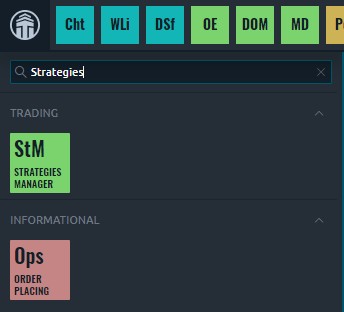
Reopen Quantower and connect to your broker as usual. Then open the main menu (the logo at the top left), type Strategies in the search box and open Strategies manager.
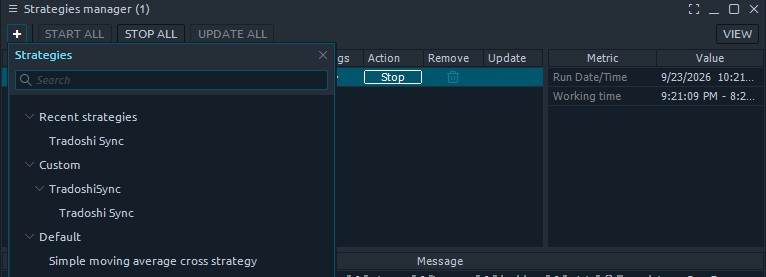
In Strategies manager, click the + at the top left, then pick Tradoshi Sync under Custom.
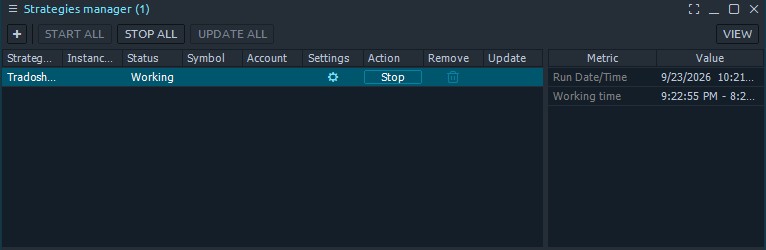
Click Run on the Tradoshi Sync row. Its status switches to Working: the collector first sends your account, then your history, then every new execution in real time.
Keep Quantower open while you trade. The collector runs inside Quantower: closed, it sends nothing. Closing it overnight is fine, it catches up on your history when you reopen it.
Sync in Tradoshi
On the Quantower row under Import / Connect, click Sync. Your executions get paired into trades (entry, exit, fees, net result) and your journal fills up. After that, every new execution flows in on its own.
Not working?
- Tradoshi Sync is not in the list: the files are not in the right folder, or Quantower was not restarted. Check the step 2 path letter by letter, then restart Quantower.
- The strategy log says tradoshi.txt cannot be found: the text file must sit next to TradoshiSync.dll, in the same folder. Download it again from Tradoshi if needed.
- Your connection stays “waiting” in Tradoshi: Quantower is not connected to your broker yet. Connect it, and the collector sends your account within seconds.
- The strategy log says the token was refused, or that the connection was removed: your connection was deleted in Tradoshi. Create a new one and replace your tradoshi.txt with the new file.
- Part of your history is missing: at startup the collector asks for up to one year of history, but how far back you actually get depends on your broker. For older history, import the Quantower trades export once.
- Some crypto pairs do not show up: the collector feeds the futures journal. A symbol that is not a futures contract is set aside, and Tradoshi tells you so instead of making up a point value for it.
Security
- The collector is read-only: it reads executions that already happened and contains no function to place, modify or cancel an order.
- Tradoshi never knows your Quantower or broker credentials.
- Your token lives in
tradoshi.txt, on your computer, and never in the strategy settings, which end up in the workspaces people share. Deleting the connection in Tradoshi makes it useless straight away.